Decoding Windows - The 'N' Edition Mystery
Ever wondered what that 'N' in Windows editions means? You're not alone! With Microsoft's recent Windows 11 release, the 'N' edition mystery has sparked curiosity among users. Did you know that Windows 'N' editions are specifically designed for certain European markets, and their feature set is tailored to comply with local regulations? As Windows 11 continues to roll out, understanding these editions is crucial for users who want to make informed decisions. Let's dive into the world of Windows 'N' editions and uncover what sets them apart from the rest.
The 'N' Factor: A Windows Enigma
You've probably heard of Windows, the popular operating system used by millions worldwide. But have you ever stumbled upon the "N" edition and wondered what it’s all about? Let's dive in. The "N" edition of Windows is essentially a special version of the operating system, primarily designed for the European market. It's not your standard Windows version, and there's a good reason for that. The story begins in 2004 when Microsoft found itself in hot water with the European Commission. The tech giant was hit with a massive antitrust ruling, which accused it of abusing its dominant position in the market by bundling Windows Media Player with its operating system. This ruling wasn't just a slap on the wrist – it was a €497 million fine and a demand for change. The European Commission wanted to give consumers more choices, and Microsoft had to comply. So, what did Microsoft do? It created a new version of Windows without Windows Media Player – and that's how the "N" edition was born. The "N" stands for "Not with Media Player," which pretty much says it all. You're getting the same Windows experience, but without the media player. This move was seen as a way for Microsoft to avoid further antitrust issues and appease regulators. But here's the thing: the "N" edition wasn't exactly a commercial success. Many users didn't see the point of having a Windows version without a media player, and it didn't exactly fly off the shelves. Still, it's an interesting footnote in Windows history and a reminder of the complex relationship between tech giants and regulators. As we explore the "N" edition further, you'll discover more about its impact on the Windows ecosystem and what it means for users today. From its rocky beginnings to its current status, the "N" edition is a fascinating case study in how tech companies navigate regulatory challenges.
The Birth of the 'N' Edition
You know how sometimes big companies get slapped with fines and regulations? That's what happened with Microsoft back in the day. The European Commission's antitrust investigation led to a hefty fine and a requirement to offer alternative versions of Windows. And that's how the 'N' edition was born - all thanks to some regulatory red tape.
The 'N' edition was Microsoft's way of complying with those regulations. Essentially, they had to strip out some features, specifically Windows Media Player, to create a version that would compete fairly in the European market. It's like when you order a burger and they hold the mayo - same thing, right? Just without the mayo... or in this case, Windows Media Player.
This all started way back in 2004 with Windows XP. Microsoft released Windows XP Home Edition N and Windows XP Professional N, both of which didn't include Windows Media Player. Instead, users could download it separately or opt for other media players like Winamp or VLC. The idea was to give consumers a choice, which is what the European Commission wanted.
The Impact
But here's the thing - the 'N' editions didn't exactly fly off the shelves. In fact, they were kind of a niche product. Most users weren't even aware they existed. But, they did serve a purpose. They showed Microsoft that regulators were serious about promoting competition. And that has had a lasting impact on how big tech companies operate in Europe.
The 'N' edition may not be a household name, but it's an important part of Windows history. And who knows, maybe one day we'll see a revival of sorts - Windows 12 'N' Edition, anyone?
Key Features Missing in 'N' Editions
So, you've decided to give Windows 'N' editions a shot, but what's missing? Well, let's get straight to it - the big one: Windows Media Player. It's gone, and that affects media playback capabilities. You won't be able to play your favorite tunes or videos with the default media player, which might be a bummer if you're used to having it at your fingertips.
Another casualty is Windows Media Center. If you've ever used it to manage and play your media collection, you'll notice it's missing. This impacts media center functionality, and you'll have to look for alternative software to fill the gap. For example, if you're a heavy user of Windows Media Center's TV recording features, you'll need to switch to something like Kodi or Plex.
Other Missing Features You Might Notice
There's more - some 'N' editions also don't include features like Windows DVD Maker. It's not a huge loss if you haven't used it, but it's another thing you'll need to replace with third-party software. And if you're thinking of using Windows' built-in media features, you might be disappointed. You'll need to rely on alternatives like VLC or iTunes to get similar functionality.
Here's a quick rundown of what else is missing:
- Windows Media Player
- Windows Media Center
- Windows DVD Maker (in some editions)
The takeaway? If you're considering a Windows 'N' edition, make sure you've got alternative media players and software in mind. It's not all bad news, though - you'll get a more streamlined Windows experience, and there are plenty of great free alternatives out there.
Impact on Users and the Market
So, how did the 'N' edition of Windows affect users and the market? Well, let's just say it was a mixed bag. For starters, the 'N' edition was met with confusion among consumers. Many didn't understand why they needed a special version of Windows without media player software.
OEMs, on the other hand, had to choose between the 'N' edition and the regular edition, which complicated distribution. Imagine being a manufacturer, trying to decide which version to install on your devices. It's not an easy choice, especially when you're trying to cater to different markets and customer needs.
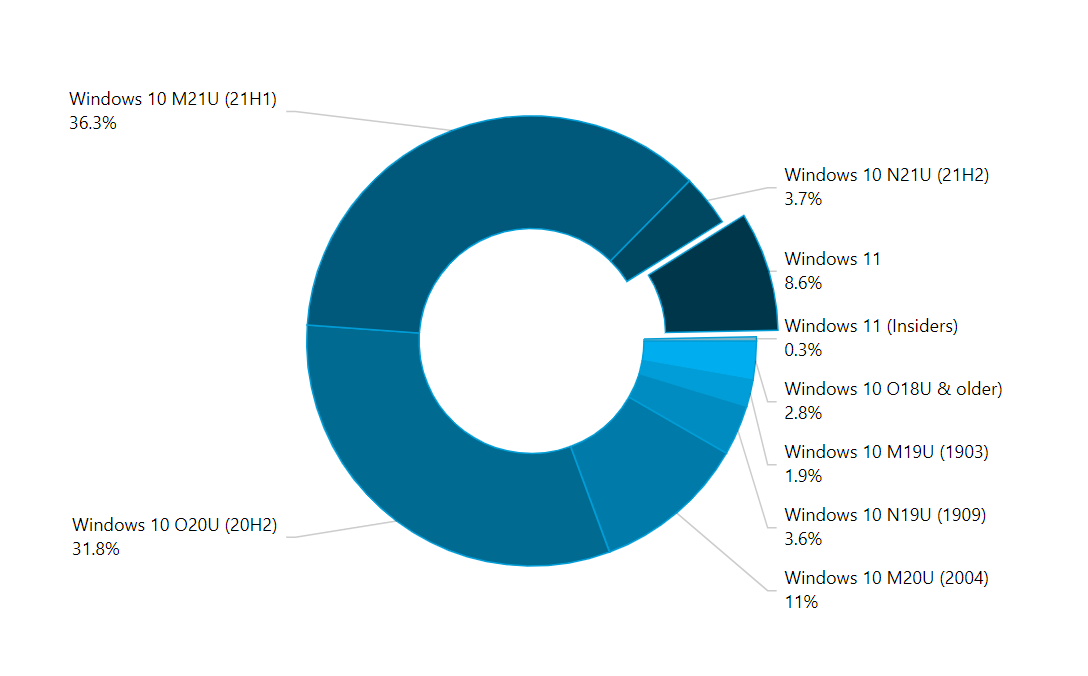
The stripped-down version of Windows had limited appeal, which affected adoption rates. According to a report by NetMarketShare, the 'N' edition accounted for less than 5% of all Windows installations in Europe. That's a tiny fraction, considering the massive user base of Windows.
A great example of this limited appeal is the case of Dell. The company offered the 'N' edition on some of its devices, but eventually stopped due to low demand. It just goes to show that, sometimes, less isn't more. People want a complete operating system, not a watered-down version.
Overall, the 'N' edition of Windows was an interesting experiment, but it ultimately failed to gain traction. As we'll see in the next section, this wasn't the only challenge Microsoft faced with Windows.
Workarounds and Alternatives: Getting What You Need
You've got a Windows N edition, and you're missing those media features. No worries, there are ways to get around it. You can download media players like VLC, which is a popular choice, or install alternative software like Kodi or PotPlayer. These players can handle most media formats, and they're free!
Third-Party Tools and Tweaks
Some features can be restored with third-party tools or registry tweaks, but be cautious, as these aren't officially supported by Microsoft. For example, you can use tools like Windows Media Player Plus! to add some functionality. However, it's crucial to download these tools from reputable sources to avoid malware.
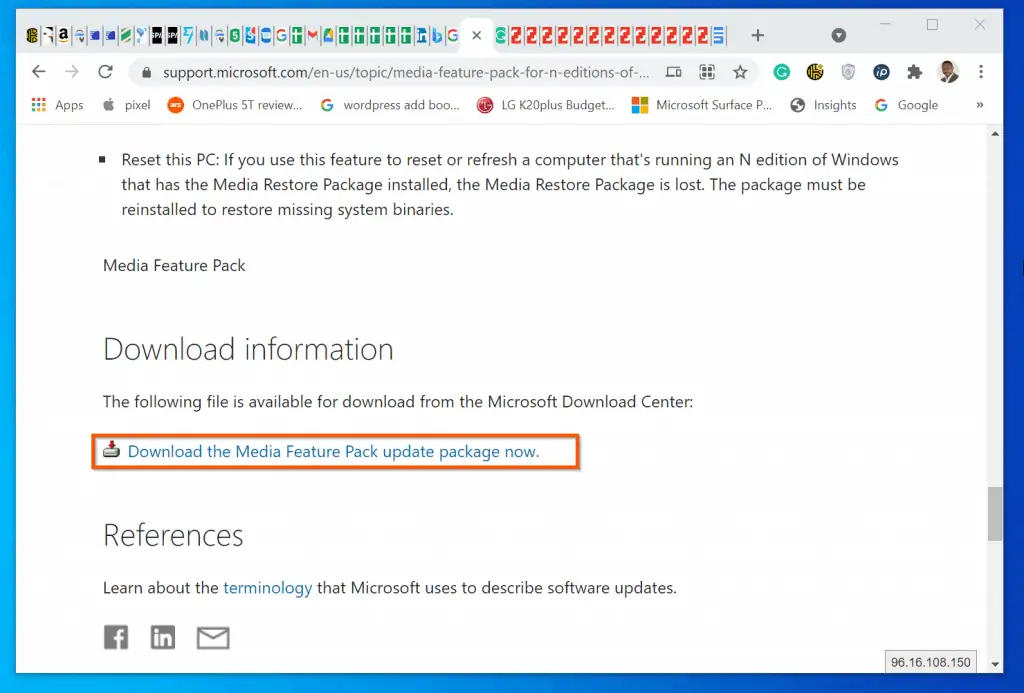
There's also a Media Feature Pack provided by Microsoft, which can restore some of the missing features. This pack is specifically designed for Windows N editions, and it's available for download from Microsoft's official website. For instance, if you need to play certain media files or use specific codecs, the Media Feature Pack might be just what you need.
- VLC Media Player: a versatile player that can handle most media formats
- Kodi: a popular media center software
- PotPlayer: a feature-rich media player
- Media Feature Pack: an official Microsoft package for Windows N editions
If you're wondering whether it's worth the hassle, consider what you need the features for. If you're a heavy media user, installing a third-party player or the Media Feature Pack might be a good idea. But if you're just using your computer for basic tasks, you might not need them.
The 'N' Edition Today
The 'N' edition is still around, mainly because of compliance reasons. You might be wondering why it hasn't been completely phased out yet. Well, it's because some organizations and businesses still require it for specific use cases.
Microsoft hasn't officially announced plans to discontinue the 'N' edition, so it's likely to be around for a while. If you're considering using it, keep in mind that it's mainly targeted at businesses and organizations with specific compliance needs. For example, the European Union's antitrust settlement back in 2004 led to the creation of the 'N' edition in the first place.
Who's Using It?
Generally, users avoid the 'N' edition unless they specifically need it for compliance or have unique use cases. It's not exactly the most popular choice among consumers, but it serves a purpose for some. In 2014, Microsoft settled another antitrust case with the European Commission, agreeing to provide Windows 7 and 8.1 'N' and 'K' editions. Some companies might still be using these versions today.
- Businesses with specific compliance requirements
- Organizations with unique use cases
- Developers testing specific scenarios
If you're thinking of using the 'N' edition, make sure you weigh the pros and cons. You'll need to consider factors like media player alternatives and compatibility issues. For most users, the standard Windows edition is the way to go. But if you need that extra layer of compliance, the 'N' edition might be just what you need.
Choosing the Right Windows Version
So, you're trying to decide which Windows version is right for you, huh? Let's break it down. If you're someone who loves streaming movies or binge-watching shows on Netflix, the 'N' edition might not be the best fit. See, these versions are stripped of media features like Windows Media Player, making it tough to play certain files without extra downloads.
Know Your Needs
Think about what you need Windows for. If media playback is crucial, consider alternatives like Windows 10 Home or Pro. For instance, if you're a student using Adobe Creative Cloud, you'll want to ensure compatibility with software requirements. Same goes for gamers – check if your favourite titles run smoothly on the 'N' edition.
Hardware's another big factor. Older devices might struggle with the latest Windows versions, so you might want to stick with something more lightweight. Take the Surface Go, for example – it's perfect for basic tasks but might need some tweaking to handle demanding apps.
- Assess your media needs before choosing a version
- Consider alternatives if media features are important
- Check for compatibility with your hardware and software requirements
Let's put it into perspective – if you're a YouTube creator, the lack of built-in media support in 'N' editions could be a hassle. But if you're all about that cloud life, using online apps like Google Photos or OneDrive, you might not even notice the difference. Bottom line: know what you need, and pick the version that fits.
Navigating Microsoft's Licensing Landscape
You're probably wondering how the 'N' edition fits into Microsoft's broader strategy. Well, let's break it down. Microsoft's approach to regional editions is all about compliance and adapting to local market needs. The 'N' edition, without Windows Media Player, is a direct response to antitrust concerns in the European Union. This flexibility allows Microsoft to stay competitive while addressing regulatory issues. When it comes to volume licensing options for businesses and organizations, things can get complex. Microsoft offers various programs, such as the Enterprise Agreement (EA) and the Microsoft Products and Services Agreement (MPSA). These programs provide flexibility and cost savings for organizations that need to deploy Microsoft software across multiple devices. For example, the EA program requires a minimum of 500 licenses, making it a good fit for larger organizations. Future trends in Microsoft's approach to regional editions and compliance will likely involve more tailored solutions. With the rise of cloud computing, Microsoft can now offer more flexible licensing options that adapt to different regions and markets. You might see more editions like the 'N' edition, each designed to meet specific regulatory requirements. So, what does this mean for you? If you're a business or organization using Microsoft products, it's essential to stay on top of licensing requirements and options. Here are some implications to consider:
- Review your current licensing agreements to ensure compliance with regional regulations.
- Explore volume licensing options to optimize costs and flexibility.
- Stay informed about future changes to Microsoft's licensing landscape.
As Microsoft continues to evolve its licensing strategy, one thing is certain – adaptability will be key. With the company's shift towards cloud-centric solutions, you can expect more innovative and flexible licensing options on the horizon. Buckle up, and get ready to navigate the ever-changing world of Microsoft licensing. You're in the driver's seat when it comes to making informed decisions about Microsoft licensing. Stay ahead of the curve, and you'll be well-equipped to handle whatever comes next.











Comments ()