Android AppLock Vulnerabilities: Understanding the Risks
Vulnerabilities in preinstalled apps on Android smartphones have raised serious concerns about device security. These vulnerabilities can be exploited by third-party apps to perform malicious actions, such as performing a factory reset, exfiltrating PIN codes, and injecting arbitrary intents with system-level privileges. Understanding these risks is crucial for anyone using an Android device, especially those who rely on security apps like PriLock.
Context: Why This Matters
The discovery of these vulnerabilities highlights the broader issue of security in preinstalled applications. Preinstalled apps often have elevated permissions, which can be misused if they contain vulnerabilities. This is a critical concern for users who assume that preinstalled apps are inherently secure, and it underscores the importance of regular security audits and updates.
Main Discussion
The PriLock App and Its Vulnerabilities
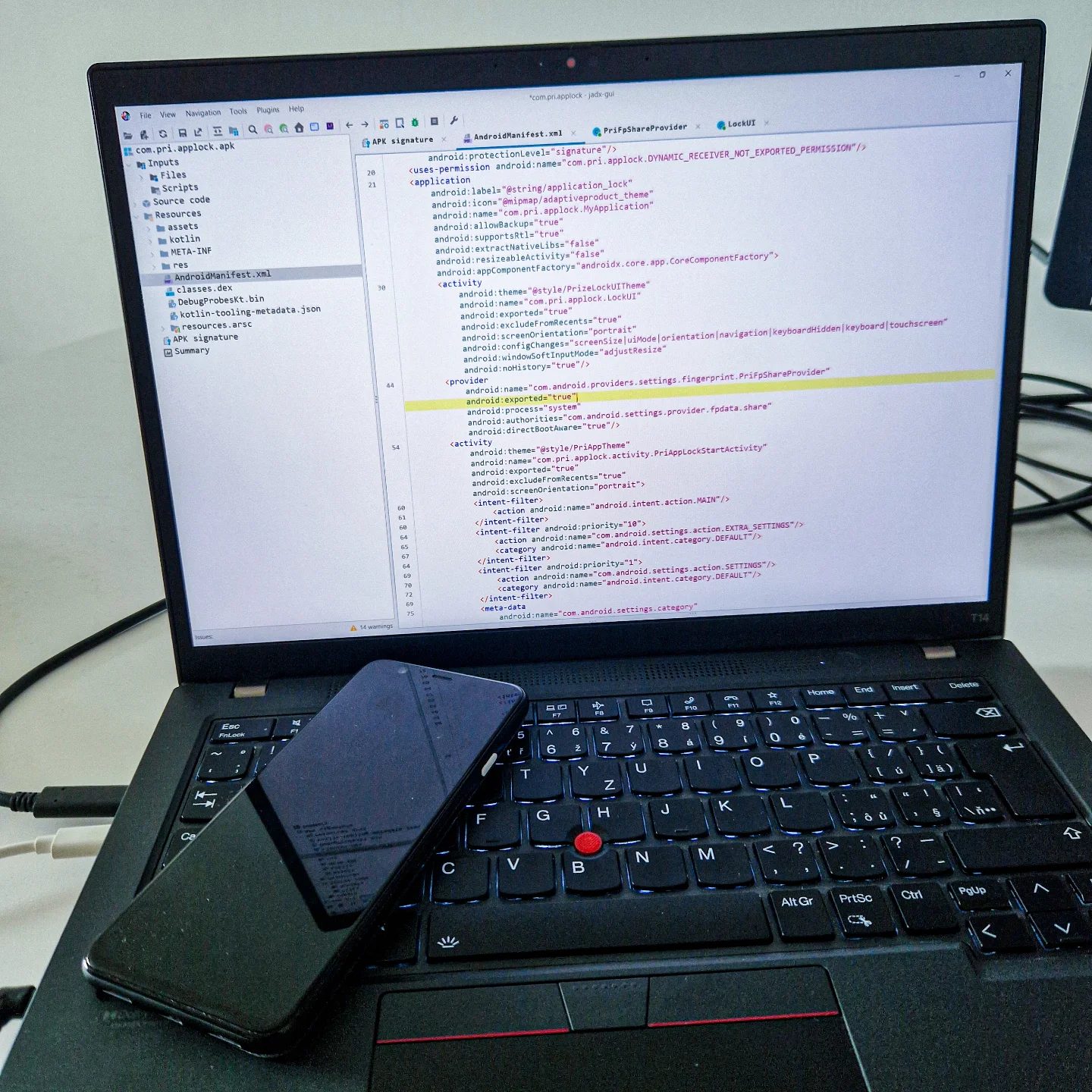
PriLock is an Android application designed to provide an applock functionality. This means it can secure individual apps on a device, requiring a password or biometric authentication to access them. However, the discovery of vulnerabilities in the code editor displaying the Android manifest file of PriLock suggests that even well-intentioned security apps can have significant flaws.
Key Vulnerabilities Identified
The vulnerabilities found in the PriLock app can be particularly concerning:
-
Factory Reset: A third-party app with malicious intent could exploit the vulnerabilities in PriLock to perform a factory reset on the device. This would erase all data, including personal files, photos, and settings.
-
PIN Code Exfiltration: Another critical vulnerability allows for the exfiltration of the PIN code. This means that an attacker could gain access to the device's lock screen PIN, effectively bypassing all security measures.
-
Arbitrary Intent Injection: The most alarming vulnerability is the ability to inject arbitrary intents with system-level privileges. This means that an attacker could potentially control the device's functionality and access sensitive data.
Understanding the Android Manifest File
The Android manifest file is a crucial component of any Android application. It provides essential information about the app to the Android system, including the app's package name, components (activities, services, etc.), and permissions.
In the case of PriLock, the manifest file contains key attributes such as:
- android:exported="true": This attribute indicates that the app's components can be accessed by other apps. While necessary for some functionalities, it can also pose a security risk if not managed properly.
- android:name="com.pri.applock": This attribute specifies the app's package name, which is essential for identifying the app within the Android ecosystem.
Practical Implications for Users
These vulnerabilities have significant implications for Android users, particularly those who rely on security apps like PriLock. It is essential to be aware of the potential risks and take proactive steps to protect your device.
Practical Tips
Regular Security Audits
Regularly audit the security of the apps installed on your device. Look for known vulnerabilities and update your apps as soon as security patches are available.
Use Trusted Sources
Always download and install apps from trusted sources. Avoid downloading apps from third-party sites or unknown developers, as they may contain malware or exploit vulnerabilities.
Enable Two-Factor Authentication
Enable two-factor authentication (2FA) on your device and any critical accounts. This adds an extra layer of security, making it harder for attackers to gain unauthorized access.
Monitor App Permissions
Regularly review the permissions granted to your apps. If an app requests unnecessary permissions, consider uninstalling it or looking for a more secure alternative.
Keep Your Device Updated
Ensure that your Android device and all installed apps are up-to-date. Updates often include security patches that address known vulnerabilities.
Use Reputable Security Apps
While PriLock has been identified with vulnerabilities, it is essential to use reputable security apps that prioritize user security. Research the app's reputation and user reviews before installation.
Important Takeaways
- Vulnerabilities in preinstalled apps can have severe consequences, including data loss and unauthorized access.
- Regular security audits and updates are crucial for maintaining device security.
- Users should be cautious when granting permissions to apps and download apps from trusted sources only.
- Using reputable security apps and enabling two-factor authentication can enhance device security.
Conclusion
The identification of vulnerabilities in preinstalled apps on Android smartphones serves as a reminder of the ongoing security challenges in mobile technology. By understanding these risks and taking proactive measures, users can better protect their devices and personal data. Regular updates, cautious permission management, and the use of reputable security apps are essential practices for enhancing device security. Stay informed and vigilant to safeguard your Android device from potential threats.
Questions readers ask
What are preinstalled apps and why are they a concern for Android security?
Preinstalled apps are applications that come with your Android device when you purchase it. They are a concern because they often have elevated permissions, giving them access to sensitive parts of your device. If these apps have vulnerabilities, they can be exploited by malicious actors to compromise your device's security.
How can vulnerabilities in preinstalled apps be exploited by malicious apps?
Malicious apps can exploit vulnerabilities in preinstalled apps to gain unauthorized access to your device. This can allow them to perform actions like factory resets, steal your PIN codes, or inject harmful commands with system-level privileges. These actions can lead to data loss, unauthorized access to your personal information, or even complete control over your device.
What is the PriLock vulnerability and how does it affect users?
The PriLock vulnerability refers to a specific flaw in the PriLock app, which is designed to enhance the security of Android devices. This vulnerability can be exploited to perform malicious actions, such as factory resets, which can compromise the security and functionality of the device. Users relying on PriLock for security may be particularly impacted, as the app's intended protective measures can be bypassed.
How can users protect themselves from vulnerabilities in preinstalled apps?
Users can take several steps to protect themselves, including keeping their devices and apps up-to-date, being cautious about the permissions they grant to apps, and avoiding downloading apps from untrusted sources. Additionally, using reputable security software can help detect and mitigate potential threats. Regularly reviewing and managing app permissions can also reduce the risk of exploitation.
What actions can be performed by malicious apps exploiting preinstalled app vulnerabilities?
Malicious apps exploiting preinstalled app vulnerabilities can perform a range of harmful actions. These include performing a factory reset, which can erase all data on the device, stealing PIN codes to gain unauthorized access, and injecting harmful commands with system-level privileges, potentially leading to further exploitation and control over the device.
What are the broader implications of these vulnerabilities for Android users?
The broader implications include increased risks of data breaches, loss of personal information, and potential control over the device by unauthorized parties. Users who rely on security apps like PriLock may find their trust in these tools compromised, as vulnerabilities can undermine the security features they depend on. It underscores the importance of being vigilant about device security and staying informed about potential risks.
What is the significance of the Android hacker0three in the context of app vulnerabilities?
The term 'Android hacker0three' refers to a security researcher who discovered and reported significant vulnerabilities in Android preinstalled apps. This researcher's findings have brought attention to the potential risks associated with preinstalled apps, highlighting the need for improved security measures and increased awareness among users and developers. By uncovering these flaws, they have contributed to enhancing the overall security landscape of Android devices.
Related deep dives
Similar reads based on topic and creator.




Recent articles
Fresh deep dives from the latest Reels we unpacked.




Comments
Be the first to comment.