Phishing Scams: How They Work and How to Protect Yourself
Phishing scams are a persistent and evolving threat in the digital world. Understanding how these scams operate and implementing effective preventive measures is crucial for safeguarding personal information and maintaining online security.
Context / Why This Matters
Phishing attacks have become increasingly sophisticated, making it challenging to distinguish between legitimate communications and fraudulent attempts. These scams often impersonate trusted entities to deceive individuals into providing sensitive information, such as passwords, credit card numbers, or personal identification details. The consequences of falling victim to a phishing attack can be severe, including identity theft, financial loss, and compromised accounts.
Main Discussion
The Anatomy of a Phishing Scam
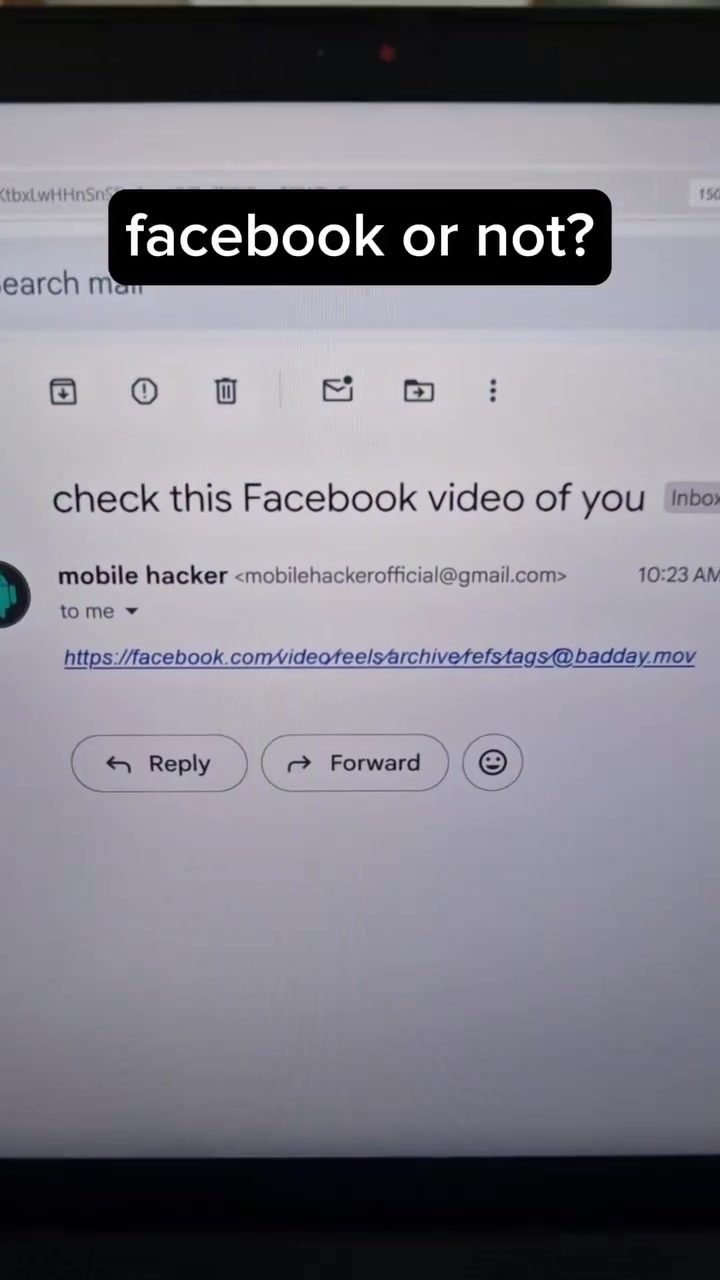
Phishing scams exploit vulnerabilities in the way URLs and domains are structured. One common tactic involves the use of unauthorized domain extensions, such as .zip or .mov, in combination with special Unicode characters to create convincing but malicious links. For example, a scam might use a link like facebook.com/video/feels/archive/tags@badday.mov to mimic a legitimate Facebook URL.
This type of phishing is possible because:
- Anyone can register domains with extensions like .zip or .mov, which can lead to the download of malicious files.
- Everything before the first slash in a URL is treated as the hostname, and the last part of the URI can include special Unicode characters, making it difficult to spot the deception at first glance.
Common Tactics Used in Phishing Attacks
Phishing scams often use convincing tactics to trick users into clicking on malicious links or providing personal information. Key tactics include:
- Impersonation: Scammers pose as well-known entities or trusted individuals to gain the victim's trust.
- Urgency: Phishing messages often create a sense of urgency, prompting the victim to act quickly without thinking.
- Deceptive URLs: As mentioned earlier, using specialized characters and domain extensions can make URLs appear legitimate.
Recognizing Phishing Attempts
Recognizing phishing attempts involves being vigilant and understanding the common signs of deception. Here are some key indicators to look out for:
- Unusual Sender Information: Be cautious of emails or messages from unknown or unverified sources. Verify the sender's email address and look for any discrepancies.
- Unusual Links and Attachments: Do not click on links or download attachments from unfamiliar or suspicious sources. Hover over links to check the full URL and ensure it is legitimate.
- Requests for Sensitive Information: Legitimate organizations will not ask for sensitive information, such as passwords or credit card numbers, via email or message. Be wary of any requests for personal data.
Practical Tips
Using Security Software
One of the most effective ways to protect against phishing attacks is to use reliable security software. Modern security solutions often include features that detect and block phishing attempts in real-time. These tools can help identify suspicious links, attachments, and other potential threats.
Staying Informed
Staying informed about the latest phishing tactics and scams can help you recognize and avoid potential threats. Regularly update your knowledge on current phishing methods and share this information with friends and family to create a safer online community.
Verifying Suspicious Links
Before clicking on any link, especially in an unsolicited email or message, verify its legitimacy. Check the URL for any unusual characters or extensions and hover over the link to see the full URL. If in doubt, contact the sender directly to confirm the authenticity of the message.
Being Cautious of Unknown Senders
Avoid interacting with messages or links from unknown or unverified senders. If you receive a suspicious message, do not open any attachments or click on any links. Delete the message immediately and report it to your email provider or security software.
Utilizing Security Features
Many email providers and social media platforms offer built-in security features that can help detect and block phishing attempts. Enable these features and regularly review your security settings to ensure they are up-to-date and effective.
Important Takeaways
Phishing scams continue to evolve and pose a significant threat to online security. By understanding the tactics used in these attacks and implementing preventative measures, individuals can protect themselves from falling victim to these deceptive practices. Key takeaways include:
- Be cautious of unsolicited messages and links, especially from unknown senders.
- Use reliable security software that can detect and block phishing attempts.
- Enable and regularly update security features on your email and social media accounts.
- Stay informed about the latest phishing tactics and share this knowledge with others.
Conclusion
Phishing scams are a persistent and evolving threat, but by understanding how they operate and taking proactive measures, individuals can significantly reduce their risk of falling victim to these deceptive practices. Stay vigilant, use security tools, and stay informed to protect yourself and your personal information in the digital world.
Questions readers ask
What are some common signs of a phishing email?
Phishing emails often display signs such as urgent or threatening language, generic greetings, spelling and grammar errors, suspicious links or attachments, and requests for sensitive information. Always be cautious of emails that ask for personal details or prompt immediate action without clear reason.
How can I protect my personal information from phishing scams on mobile devices?
To protect against phishing on mobile, be wary of unsolicited messages or calls. Avoid clicking on unknown links or downloading attachments from strangers. Use security software and keep your device's operating system up-to-date. Be cautious of public Wi-Fi networks, as they can be less secure.
What should I do if I suspect a phishing link in an email?
If you suspect a phishing link, do not click on it. Hover over the link to see the actual URL; if it looks suspicious or doesn't match the expected destination, avoid it. Report the email to your email provider and delete it from your inbox. Consider using link-checking tools for added verification.
How do phishing scams work on social media platforms like Facebook?
Phishing scams on Facebook often involve fake profiles or messages that mimic trusted friends or companies. They may ask for personal information, login credentials, or direct you to malicious websites. Always verify the authenticity of messages and profiles, and avoid sharing sensitive information on social media.
What are some practical online security tips to avoid phishing attacks?
To avoid phishing attacks, enable two-factor authentication on your accounts, use unique and strong passwords, regularly update your software, and be cautious of unsolicited communications. Verify the legitimacy of requests for sensitive information and use security tools to detect and block phishing attempts.
Related deep dives
Similar reads based on topic and creator.




Recent articles
Fresh deep dives from the latest Reels we unpacked.




Comments
Be the first to comment.