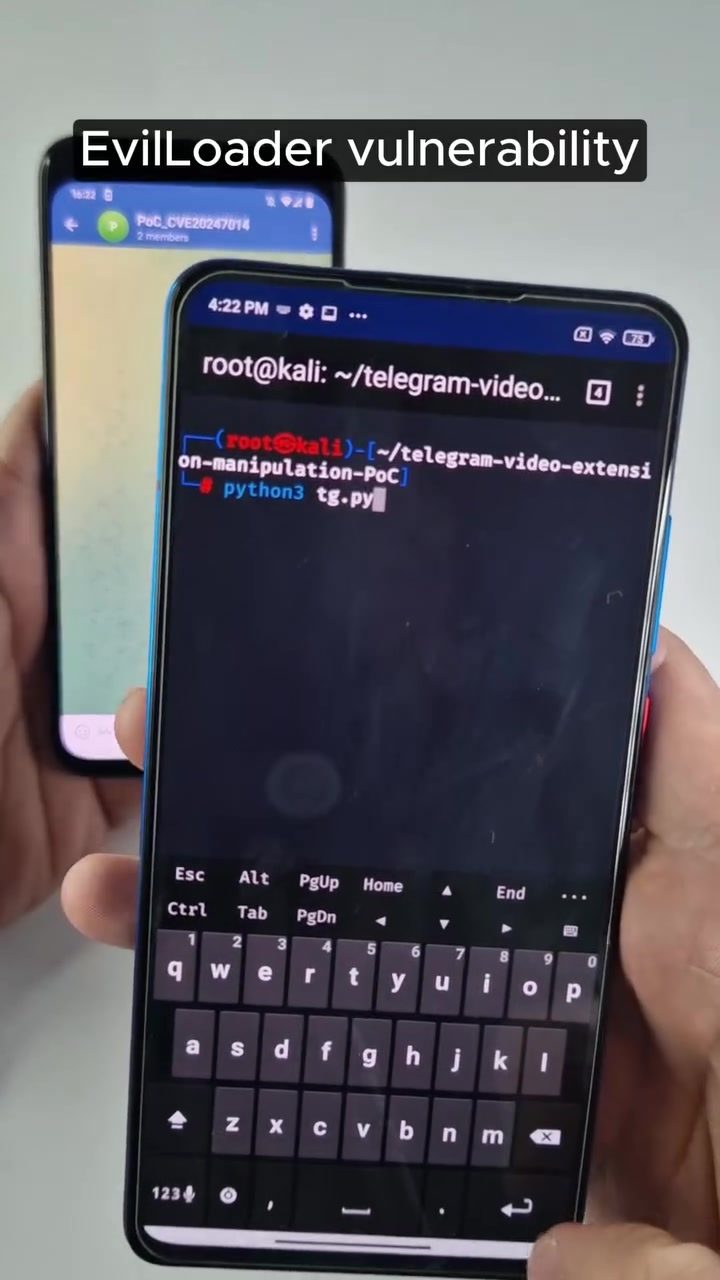
Telegram Vulnerability: Understanding CVE-2024-7014
Telegram is a popular messaging app known for its emphasis on security and privacy. However, no platform is immune to vulnerabilities, and a recent proof-of-concept (PoC) exploit has highlighted a significant flaw in the Android version of the app. This vulnerability, identified as CVE-2024-7014, has been sold on underground forums since January 2025. The exploit demonstrates the risks associated with downloading and installing external video players when prompted by corrupted video files on Telegram.
Why This Matters
With over 700 million active users, Telegram is a critical communication tool for many. However, vulnerabilities like CVE-2024-7014 can compromise users' security and privacy. Understanding the nature of this exploit and how to protect against it is essential for anyone using Telegram, especially on Android devices.
Exploiting the Vulnerability
The Initial Attack Vector
CVE-2024-7014 exploits a specific weakness in how Telegram handles video files on Android. The attack begins when a user receives a corrupted video file via Telegram. When the user attempts to play the video, Telegram displays an error message indicating that the app is unable to play the file. The message then suggests downloading and installing an external video player to view the content.
The Danger of External Players
The request to install an external video player is where the vulnerability becomes particularly dangerous. If the user proceeds with the installation, they are prompted to download an APK file from an untrusted source. This APK file, often disguised as a harmless video player, can contain malicious code designed to exploit the device.
The Python Script: Exploiting the Weakness
The exploit is facilitated using a Python script, tg.py. This script is demonstrated in a terminal window, showcasing how the vulnerability can be exploited. The script likely interacts with the APK file to execute the malicious code, gaining unauthorized access to the device. The on-screen text mentions root@kali:~/, indicating that the script is run from a Kali Linux environment, a favorite among cybersecurity professionals for its comprehensive suite of penetration testing tools.
Practical Tips to Stay Safe
Avoiding Untrusted APKs
The most effective way to protect against this vulnerability is to avoid installing external video players from unknown or untrusted sources. Telegram's suggestion to use an external player should be treated with caution, and users should verify the source of any APK files before installation.
Verifying File Sources
Always check the authenticity of the files you download. If you receive a video file that fails to play and prompts you to install an external player, double-check the file's origin and the source of the player. Avoid downloading APKs from unfamiliar or unverified websites.
Keeping Software Updated
Ensure that your smartphone and all installed applications, including Telegram, are updated to the latest versions. Developers often release patches and updates to fix known vulnerabilities and enhance security.
Important Takeaways
- Avoid Untrusted Sources: Never install external video players or download APKs from untrusted sources.
- Verify File Origins: Always verify the authenticity and source of files you receive.
- Keep Software Updated: Regularly update your smartphone and applications to protect against known vulnerabilities.
- Be Cautious with Prompts: Treat prompts to install external players with skepticism, especially if they come from unexpected or unfamiliar sources.
Conclusion
The CVE-2024-7014 vulnerability in Telegram for Android serves as a stark reminder of the importance of cybersecurity awareness. By understanding the risks associated with downloading and installing untrusted APKs, users can better protect their devices and personal information. Stay vigilant, verify the authenticity of files, and keep your software updated to minimize the risk of falling victim to such exploits.
Questions readers ask
What makes CVE-2024-7014 a significant threat to Telegram users on Android?
CVE-2024-7014 is significant because it allows attackers to exploit corrupted video files, tricking users into installing malicious external video players. This can lead to unauthorized access to the user's device and personal data, compromising both security and privacy.
How does the CVE-2024-7014 exploit work on Telegram Android?
The exploit targets the way Telegram handles video files. When a user receives a corrupted video file, Telegram may prompt them to install an external video player. If the user installs the suggested player, it could be a malicious application that compromises their device.
Why are external video players a risk when prompted by Telegram?
External video players suggested by Telegram, especially when linked to corrupted files, could be malicious. Installing these players can give hackers control over your device, potentially leading to data theft and other security breaches.
What is hacker0evilloader, and how is it related to CVE-2024-7014?
Hacker0evilloader is a tool used by cybercriminals to exploit the CVE-2024-7014 vulnerability. It takes advantage of the way Telegram handles videos, tricking users into installing harmful software that can steal sensitive information from their Android devices.
What steps can Telegram Android users take to avoid falling victim to the CVE-2024-7014 exploit?
To minimize risk, users should avoid installing external video players when prompted by Telegram, especially for unfamiliar or unsolicited video files. It is also advisable to keep the Telegram app and your Android device updated, and install files from reputable sources.
Related deep dives
Similar reads based on topic and creator.




Recent articles
Fresh deep dives from the latest Reels we unpacked.




Comments
Be the first to comment.