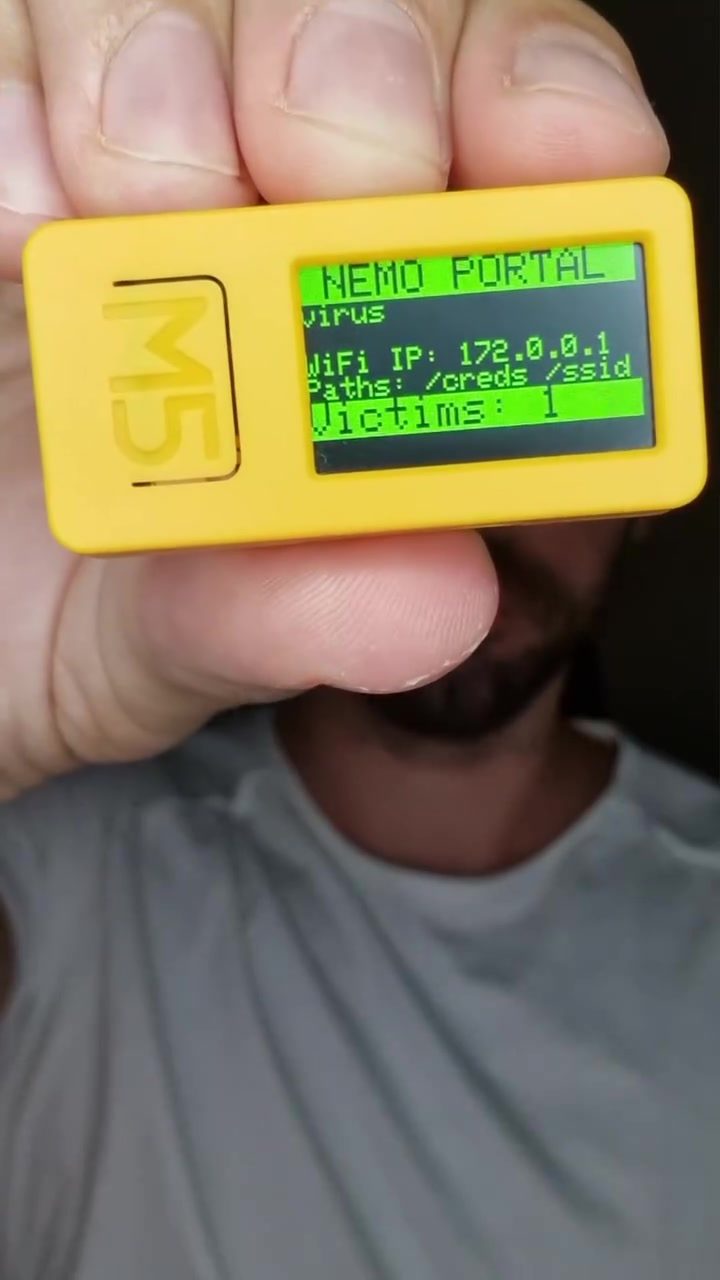
Portable devices have become increasingly sophisticated, and among them are tools designed to test and exploit vulnerabilities in wireless networks. One such device is the M5Stick, a compact gadget equipped with infrared, Wi-Fi, and Bluetooth capabilities. It can easily fit in the palm of your hand, making it a discreet but powerful tool for both cybersecurity professionals and malicious actors.
Context / Why this matters
In an era where Wi-Fi is ubiquitous, understanding the risks associated with public wireless networks is crucial. The M5Stick, running the Nemo firmware developed by 4x0nn, can capture credentials by cloning existing Wi-Fi networks. This means it can disconnect users from their current networks and lure them onto a rogue network, where their credentials can be intercepted. This capability highlights the importance of being vigilant about the networks we connect to and the devices we use.
Main Discussion
The M5Stick and Wi-Fi Cloning
The M5Stick is designed to perform Wi-Fi scans and target specific networks by deauthenticating all clients. This process involves disconnecting all devices from the legitimate network and then creating a clone of that network. When users attempt to reconnect, they are directed to the cloned network, where their credentials can be intercepted. This method is particularly effective in public places like coffee shops and train stations, where free public Wi-Fi is common.
How It Works
The process begins with the M5Stick performing a Wi-Fi scan to identify the target network. Once identified, the device deauthenticates all connected clients, effectively kicking them off the network. Simultaneously, it creates a cloned network with the same name, tricking users into connecting to it. When a user connects to the cloned network, they are prompted to enter their credentials, which the M5Stick then intercepts.
The Dangers of Unsecured Networks
Public Wi-Fi networks are convenient but come with significant risks. When a user connects to an unsecured network, they are vulnerable to attacks from devices like the M5Stick. These devices can capture sensitive information, including login credentials, emails, and other personal data. The use of public Wi-Fi without proper security measures can therefore lead to severe breaches and identity theft.
Prevention and Safety Measures
To protect against such threats, several measures can be implemented:
-
Avoid Unsecured Networks: Whenever possible, avoid connecting to unsecured public Wi-Fi networks. If you must use them, be cautious about the data you access and the actions you perform.
-
Use a Virtual Private Network (VPN): A VPN encrypts your internet traffic, making it difficult for attackers to intercept your data. This is especially useful when using public Wi-Fi.
-
Enable Two-Factor Authentication (2FA): Two-factor authentication adds an extra layer of security by requiring a second form of verification, such as a code sent to your mobile device. This can help protect your accounts even if your credentials are compromised.
-
Use Personal Hotspots: If you have a mobile data plan, consider using your phone as a hotspot. This provides a more secure connection than public Wi-Fi, as the data is encrypted and the network is exclusive to your device.
Practical Tips
Recognizing Evil Portals
An "evil portal" is a term used to describe a cloned network that tricks users into connecting to it. To recognize an evil portal, look for signs of a cloned network, such as an unusual Wi-Fi name or inconsistent network behavior. Always verify the legitimacy of a network before connecting.
Securing Your Devices
Enhance the security of your portable devices by keeping your software and firmware up-to-date. Regular updates often include patches for known vulnerabilities, making your devices less susceptible to attacks. Additionally, consider using security software that can alert you to potential threats and protect your data.
Staying Safe in Public Spaces
When using public Wi-Fi, always prioritize your security. Avoid accessing sensitive information or performing financial transactions. If you need to use such services, ensure you are on a secure network, and consider using a VPN for added protection.
Important Takeaways
- Portable devices like the M5Stick can clone Wi-Fi networks and intercept credentials.
- Public Wi-Fi networks are common targets for such attacks.
- Use a VPN, enable two-factor authentication, and avoid unsecured networks to stay safe.
- Be cautious when using public Wi-Fi and prioritize your security.
Conclusion
The M5Stick and similar devices represent a significant risk to users of public Wi-Fi networks. By understanding how these tools work and implementing effective security measures, you can protect your personal information and stay safe online. Always be vigilant about the networks you connect to and the devices you use, and prioritize your security to minimize the risk of falling victim to cyberattacks.
Questions readers ask
What is the M5Stick Wi-Fi hacking device and how does it work?
The M5Stick is a small, portable device with Wi-Fi, Bluetooth, and infrared capabilities. It can clone existing Wi-Fi networks, often by running the Nemo firmware, to create a fake network that users can connect to. Once connected, the device can intercept and steal user credentials.
Why are public Wi-Fi networks particularly vulnerable to the M5Stick?
Public Wi-Fi networks are often less secure than private networks, making them easier targets. The M5Stick can exploit this by mimicking legitimate networks, leading unsuspecting users to connect and unwittingly expose their credentials.
What should I do if I suspect my Wi-Fi network has been compromised by an M5Stick device?
If you suspect your network has been compromised, immediately disconnect from the network. Change your Wi-Fi password and enable strong encryption, such as WPA3. Additionally, monitor your accounts for any unusual activity and report any suspicious behavior to your network administrator.
How can I protect my Wi-Fi credentials from devices like the M5Stick?
To protect your Wi-Fi credentials, avoid connecting to unfamiliar or unsecured public networks. Use a Virtual Private Network (VPN) for an added layer of security. Always verify the network name with the venue's staff when in doubt, and ensure your device's software is up to date with the latest security patches.
Can the M5Stick be used for legitimate purposes, and if so, what are they?
Yes, the M5Stick can be used for legitimate purposes in the realm of cybersecurity. Professionals use it to test the vulnerabilities of wireless networks, helping organizations identify and fix security weaknesses. However, it's essential to use such tools responsibly and ethically, with proper authorization.
What are some common signs that a Wi-Fi network might be a clone created by an M5Stick?
Signs of a potentially cloned Wi-Fi network include slight variations in the network name, such as extra spaces or characters, as well as unusually slow performance. Your device may also show a 'captive portal' or login page differently than usual. Always double-check the network name and consult with venue staff if in doubt.
What steps can businesses take to prevent Wi-Fi hacking with devices like the M5Stick?
Businesses can implement several measures to prevent Wi-Fi hacking. This includes using strong, complex passwords, enabling network encryption, regularly updating security protocols, and monitoring network activity for unusual patterns. Additionally, hiding the network name (SSID) can make it less visible to potential hackers.
Related deep dives
Similar reads based on topic and creator.




Recent articles
Fresh deep dives from the latest Reels we unpacked.




Comments
Be the first to comment.