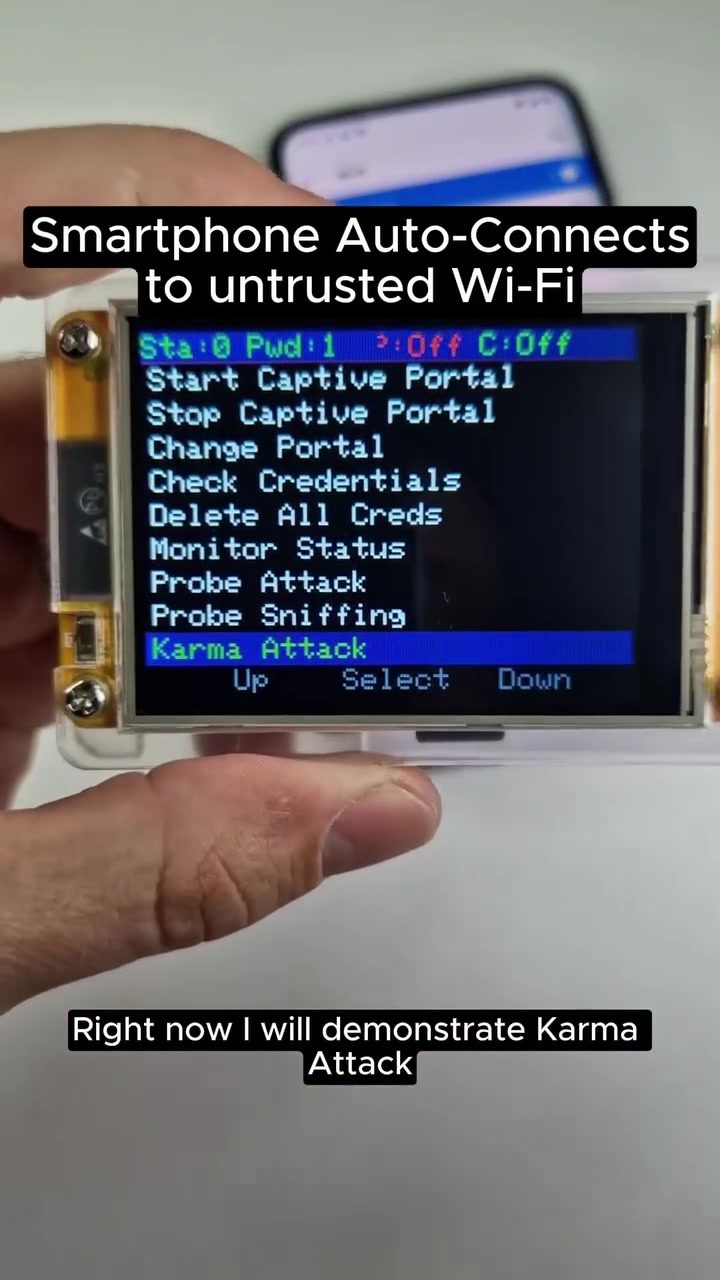
Karma Attacks: Understanding Wi-Fi Auto-Reconnection Risks
Smartphones and other devices can automatically reconnect to familiar Wi-Fi networks, even if those networks are untrusted or malicious. This phenomenon is often exploited through a technique known as a Karma attack. Understanding how these attacks work and how to protect against them is crucial for maintaining digital security.
Why This Matters
In today's connected world, Wi-Fi networks are ubiquitous. From coffee shops to airports, public Wi-Fi is convenient but also poses significant security risks. Karma attacks prey on the automatic reconnection features of devices, making it easy for attackers to impersonate trusted networks and lure unsuspecting users into connecting to malicious access points.
What is a Karma Attack?
A Karma attack is a type of hacking technique where an attacker impersonates a familiar Wi-Fi network to trick devices into connecting. Smartphones, for instance, often remember previously connected networks and will automatically reconnect to them when in range. Attackers exploit this behavior by creating a network with the same name as one the device has connected to before. Once the device connects, the attacker can intercept data, steal credentials, or even suggest downloading malware.
How It Works
The process of a Karma attack involves several steps:
- Network Impersonation: The attacker uses a tool to scan for networks that the target device has connected to in the past. These tools can identify the SSIDs (network names) that the device recognizes.
- Creating a Fake Network: The attacker then creates a fake network with the same SSID as one of the recognized networks. This fake network is often called an "evil twin" because it mimics a trusted network.
- Auto-Reconnection: When the target device is within range of the fake network, it automatically connects to it, believing it is the legitimate network.
- Data Interception: Once connected, the attacker can intercept data, capture credentials, or redirect the user to a malicious website.
Tools and Techniques
Several tools and techniques are commonly used in Karma attacks. Some of the key ones include:
- Karma Attack: This specific tool scans for networks that the target device has connected to and creates a fake network with the same SSID.
- Probe Sniffing: This technique involves capturing probe requests sent by devices looking for known networks. These requests can reveal the SSIDs that the device has connected to in the past.
- Captive Portals: These are web pages that appear when a device connects to a network, often requiring the user to enter credentials or agree to terms. In a Karma attack, the captive portal can be manipulated to display malicious content.
Protecting Against Karma Attacks
Given the risks associated with Karma attacks, it's essential to take proactive measures to protect your devices. Here are some practical tips to enhance your security:
Disable Auto-Reconnection
One of the most effective ways to protect against Karma attacks is to disable the auto-reconnection feature on your devices. This prevents your device from automatically connecting to any network, even if it has been recognized before.
Forget Unused Networks
Regularly review and forget unused Wi-Fi networks from your device's list of saved networks. This reduces the number of networks your device will attempt to reconnect to, minimizing the risk of falling for a fake network.
Turn Off Wi-Fi When Not in Use
Turning off Wi-Fi when you are not using it can prevent your device from automatically connecting to any network. This is especially important in public places where malicious networks are more likely to be present.
Use Cellular Data
When possible, rely on cellular data instead of public Wi-Fi. This eliminates the risk of connecting to a fake or malicious network.
Verify Captive Portals
Always verify captive portals before entering any credentials. If a network requires you to log in or agree to terms, make sure it is legitimate and that you are not being redirected to a malicious site.
Use Security Software
Consider using security software that can detect and alert you to potential threats, including fake networks. Many security apps offer features designed to protect against Wi-Fi-based attacks.
Important Takeaways
- Understand the Risk: Recognize that automatic reconnection to Wi-Fi networks can be exploited by attackers.
- Protect Your Devices: Disable auto-reconnection, forget unused networks, and turn off Wi-Fi when not in use.
- Be Vigilant: Always verify captive portals and use security software to protect against threats.
Conclusion
Karma attacks highlight the vulnerabilities associated with automatic Wi-Fi reconnections. By understanding how these attacks work and taking proactive measures to protect your devices, you can significantly reduce the risk of falling victim to such exploits. Stay vigilant and prioritize your digital security to ensure a safe and secure online experience.
Questions readers ask
What is a Karma attack and how does it work?
A Karma attack is a security threat that tricks Wi-Fi-enabled devices into connecting to malicious networks. It exploits the auto-connect feature, which makes devices automatically reconnect to familiar networks, even if they are impersonated by attackers. When a device joins a malicious network, attackers can intercept data, steal credentials, or distribute malware.
Which devices are most at risk of Karma attacks?
Smartphones and other portable devices that frequently connect to public Wi-Fi networks are at the highest risk. These devices often have the auto-connect feature enabled, making them prime targets for attackers who mimic trusted networks. This is especially true for smartphones and tablets, as they are always connected.
How can I protect my smartphone from Karma attacks?
To prevent Karma attacks on your smartphone, disable the auto-connect feature for Wi-Fi networks. Regularly update your device's operating system, as updates often include security patches. Additionally, use a reputable VPN to encrypt your data, and be cautious about connecting to unfamiliar or unsecured networks.
What is a captive portal, and how can it help prevent Karma attacks?
A captive portal is a web page that users see when they first connect to a Wi-Fi network, often requiring them to log in or accept terms of service. Enabling a captive portal can help prevent Karma attacks by requiring user interaction before gaining full access to the network, making it harder for devices to automatically connect to malicious networks.
What are the main security risks associated with Karma attacks?
The primary security risks include data interception, credential theft, and malware distribution. Once a device is tricked into connecting to a malicious network, attackers can monitor internet traffic, steal usernames, passwords, and personal information, and even install malicious software on the device.
How can I ensure secure Wi-Fi connections when using public networks?
To ensure secure Wi-Fi connections, avoid connecting to public networks without first verifying their legitimacy. If you need to connect, use a VPN to encrypt your data, and be cautious of any unusual behavior on your device. Always prefer secure networks that require a password and disable any auto-connect features on your device.
What steps should I take if I suspect my device has been targeted by a Karma attack?
If you suspect your device has been targeted, immediately disconnect from the network in question. Run a full malware scan using a reputable antivirus software, and change any passwords that may have been compromised. Consider resetting your network settings and updating your device's software to the latest version to enhance security.
Related deep dives
Similar reads based on topic and creator.




Recent articles
Fresh deep dives from the latest Reels we unpacked.




Comments
Be the first to comment.