Keystroke Injection: Understanding the Cybersecurity Threat
Keystroke injection attacks pose a significant cybersecurity threat, and understanding this vulnerability could protect your devices in 2025. This form of attack involves the use of devices like the BlueDucky, which can simulate keystrokes to inject malicious commands into a target system. Let's dive into what keystroke injection is, how it works, and why keeping your devices up-to-date is crucial for your safety.
Keystroke Injection in Mobile Security
Keystroke injection is a type of cyberattack where an external device simulates keystrokes on a target system, often a smartphone or computer. This can be used to exploit vulnerabilities that allow unauthorized access or command execution. In this case, the device used is the BlueDucky, a specialized tool for demonstrating and testing such vulnerabilities.
The Vulnerability
The specific vulnerability highlighted in the demonstration is designated CVE-2023-43866. This type of vulnerability allows an attacker to bypass security measures and execute commands remotely. The BlueDucky device connects to the target system and sends keystrokes that mimic legitimate user input, thereby executing malicious code.
The BlueDucky in Action
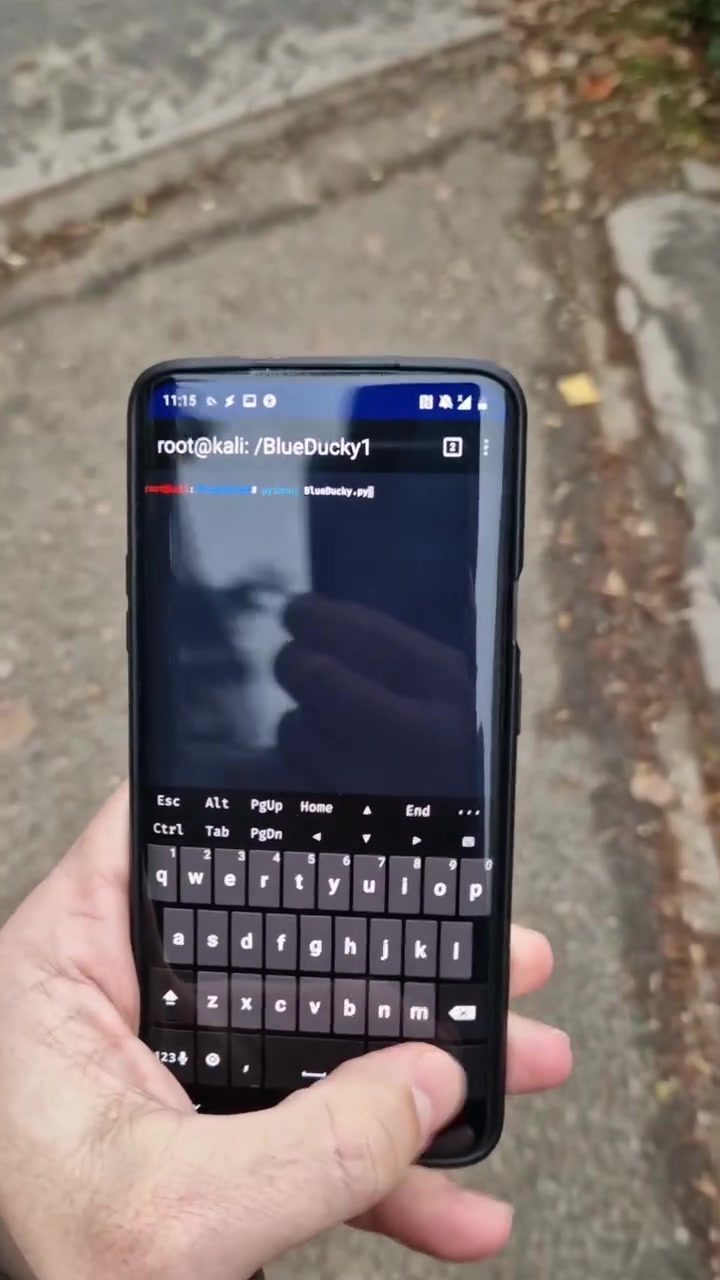
The BlueDucky device is designed to be a versatile tool for both security professionals and malicious actors. It can simulate a wide range of keystrokes, making it a powerful weapon in the arsenal of a cybercriminal. The demonstration involves connecting the BlueDucky to a smartphone, which then displays a terminal interface with code execution. The terminal output shows messages related to processing and sending letters, indicating successful keystroke injection.
The terminal interface is a key component in this demonstration. The commands root@kali: /BlueDucky1 and python3 BlueDucky.py indicate that the attacker is running a script from the BlueDucky device. This script is designed to exploit the CVE-2023-43866 vulnerability, allowing the device to send keystrokes to the target system. The message "successful keystroke injection" confirms that the attack has been executed successfully.
How Keystroke Injection Works
Keystroke injection works by exploiting vulnerabilities in the way a system handles input. The BlueDucky device can simulate keystrokes that the target system interprets as legitimate user input. This can be used to execute commands, open malicious files, or even take control of the system.
The process involves several steps:
- Connection: The BlueDucky device connects to the target system, either through a USB port or other input methods.
- Keystroke Simulation: The device simulates keystrokes that the system interprets as legitimate input.
- Command Execution: The simulated keystrokes execute commands that exploit the vulnerability, allowing the attacker to gain control of the system.
Practical Tips for Protecting Your Devices
To protect your devices from keystroke injection attacks, follow these practical tips:
-
Keep Software Up-to-Date: One of the most effective ways to protect against keystroke injection is to keep your software and operating systems up-to-date. Regular updates often include patches for known vulnerabilities, reducing the risk of exploitation.
-
Disable Unnecessary Input Devices: If you are not using a specific input device, such as a USB port, disable it. This can prevent unauthorized devices from connecting to your system.
-
Use Security Software: Invest in robust security software that includes features like keylogger detection and input monitoring. This can help identify and block suspicious activity.
-
Enable Two-Factor Authentication: Two-factor authentication adds an extra layer of security. Even if an attacker gains access to your device, they would still need a second form of authentication to execute commands.
-
Regularly Scan for Vulnerabilities: Use tools that can scan your system for vulnerabilities and offer patches or fixes. Regular scans can help identify and resolve potential weaknesses before they are exploited.
Important Takeaways
Keystroke injection attacks are a serious threat to mobile and computer security. By understanding how they work and taking preventive measures, you can significantly reduce the risk of falling victim to such an attack. Keeping your devices up-to-date, disabling unnecessary input devices, using security software, enabling two-factor authentication, and regularly scanning for vulnerabilities are all essential steps in protecting your system from keystroke injection.
Conclusion
As we move into 2025, the importance of cybersecurity cannot be overstated. Keystroke injection attacks, as demonstrated with the BlueDucky device, highlight the need for vigilance and proactive measures. By staying informed and taking the necessary precautions, you can ensure that your devices remain secure against this and other types of cyber threats.
Questions readers ask
What is a keystroke injection attack and how does it work?
A keystroke injection attack involves a device, like the BlueDucky, which simulates keystrokes to send malicious commands to a target system. This can exploit vulnerabilities, such as CVE-2023-43866, to execute unauthorized commands and gain unauthorized access to devices, including smartphones.
How does the BlueDucky device facilitate keystroke injection attacks?
The BlueDucky device is designed to mimic keystrokes and inject malicious commands into smartphones and other devices. It connects to the target device through an interface, such as a USB port, and can execute commands to exploit vulnerabilities that allow unauthorized access.
What is the significance of the CVE-2023-43866 exploit in relation to keystroke injection?
CVE-2023-43866 is a vulnerability that can be exploited through keystroke injection attacks using devices like the BlueDucky. This particular exploit allows unauthorized commands to be executed on smartphones and other devices, posing a significant mobile security threat.
How can I protect my smartphone from keystroke injection attacks?
To protect your smartphone, ensure that your device is kept up-to-date with the latest security patches. Additionally, avoid connecting your device to unknown or untrusted USB or other interfaces, and be cautious about using third-party accessories that could potentially be compromised.
What types of commands can be injected through a keystroke injection attack?
Keystroke injection attacks can inject a variety of commands, including those that exploit known vulnerabilities, execute malicious scripts, or gain unauthorized access to the target system. The specific commands depend on the exploit being used and the vulnerabilities present in the target device.
What is the BlueDucky1 terminal and how is it related to mobile hacking?
The BlueDucky1 terminal is a specific model of the BlueDucky device used for keystroke injection attacks. It is designed to connect to mobile devices and other systems through interfaces like USB, allowing attackers to inject malicious commands and exploit vulnerabilities, including those related to smartphone cybersecurity.
Why is it important to stay informed about cybersecurity threats like keystroke injection for 2025?
Keeping informed about cybersecurity threats like keystroke injection is crucial for protecting your devices in 2025. Cyberattacks are evolving, and understanding the mechanisms behind these threats helps you take proactive measures, such as updating your devices and being cautious about device connections, to safeguard against unauthorized access and command execution.
Related deep dives
Similar reads based on topic and creator.




Recent articles
Fresh deep dives from the latest Reels we unpacked.




Comments
Be the first to comment.